pg-workflows
@pg-workflows/ui
React components, hooks, and HTTP adapters for pg-workflows. Render the full dashboard, compose the individual components, or build your own UI on the hooks.
Quickstart
npx @pg-workflows/ui
Open http://127.0.0.1:3777.
The CLI connects to postgres://localhost:5432/postgres. To use another database, pass --database-url or set DATABASE_URL:
npx @pg-workflows/ui --database-url=postgres://user:pass@localhost:5432/mydb
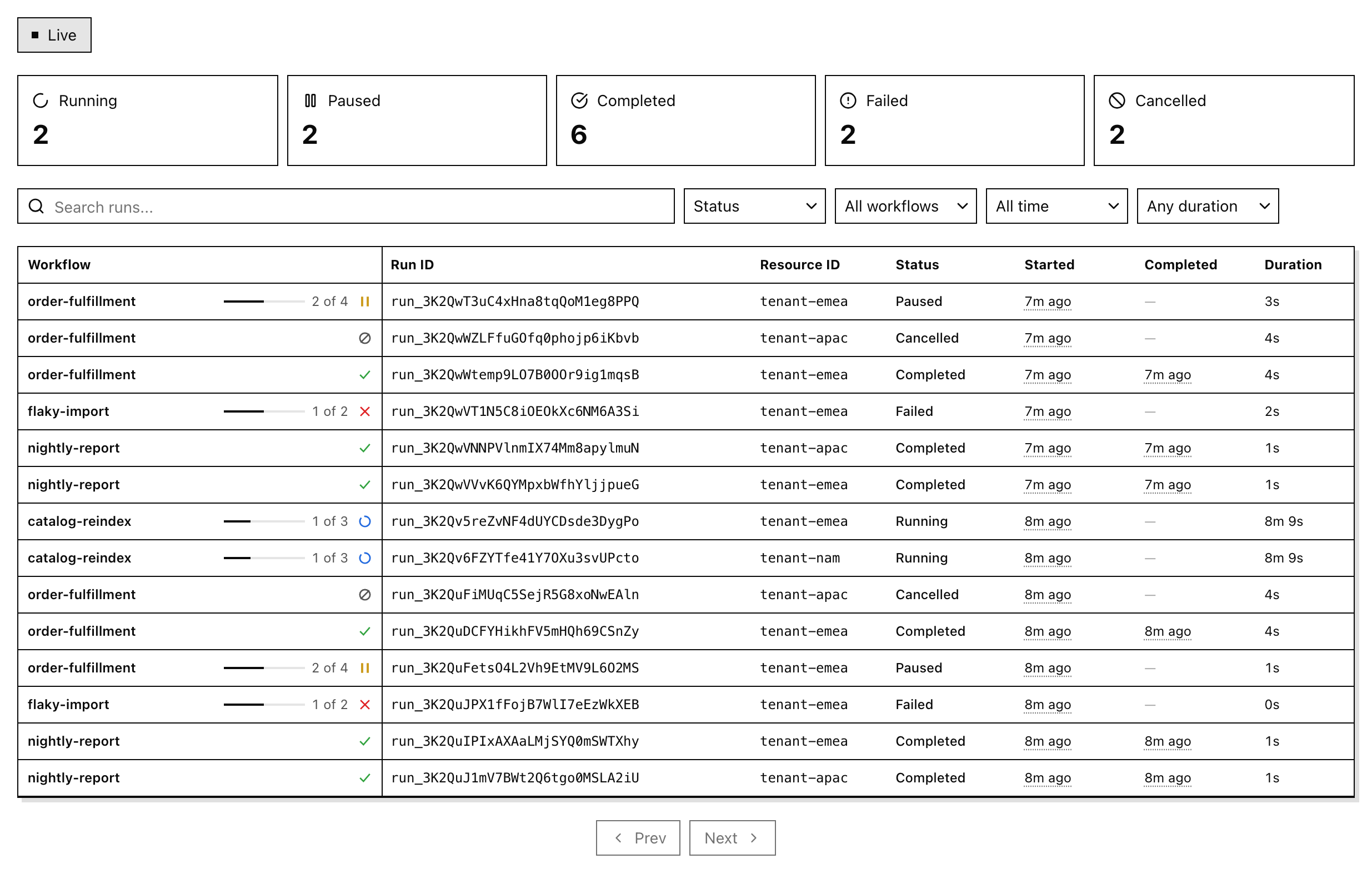
The dashboard lists runs and sends lifecycle actions (cancel, pause, resume, fast-forward, trigger). It registers no workflows of its own. On start it runs the engine migrations, so it creates the pg-workflows tables and pg-boss schema in the target database if they are missing. See CLI for every flag and caveat.
Add it to your app
This walkthrough adds the dashboard to a Next.js App Router app with Tailwind CSS v4. For other servers, see Server adapters. examples/dashboard is a complete working app.
1. Install
npm install @pg-workflows/ui @tanstack/react-query pg-workflows pg
If you don’t have an app yet, npx create-next-app@latest --ts --tailwind --app creates one with Tailwind v4 and the @/ import alias that the snippets below use.
2. Create one engine per process
// lib/engine.ts
import { WorkflowEngine } from 'pg-workflows'
import { workflows } from './workflows' // your workflow definitions, as an array

// Cache the engine on globalThis. Next re-evaluates modules on hot reload,
// and each new engine opens another pool and another set of workers.
const globalForEngine = globalThis as unknown as { engine?: WorkflowEngine }

export function getEngine() {
  if (!globalForEngine.engine) {
    const connectionString = process.env.DATABASE_URL
    if (!connectionString) throw new Error('DATABASE_URL is not set')
    globalForEngine.engine = new WorkflowEngine({ connectionString, workflows })
  }
  return globalForEngine.engine
}
engine.start() also starts queue workers, so this process executes workflow runs. Register every workflow definition here: a worker that picks up a run for an unregistered workflow fails that job with Workflow <id> not found. Registered definitions also let the runs table show progress against each workflow’s total step count.
3. Mount the API with one optional catch-all route:
// app/workflow-runs/[[...path]]/route.ts
import { createAppRouterHandler } from '@pg-workflows/ui/next'
import { getEngine } from '@/lib/engine'

export const { GET, POST } = createAppRouterHandler({ engine: getEngine })
Pass getEngine itself, not getEngine(). The handler calls it when a request arrives, so next build can import the route without a database connection. The first request awaits engine.start().
4. Add the styles to app/globals.css:
@import 'tailwindcss';
@import '@pg-workflows/ui/styles.css';

@source '../node_modules/@pg-workflows/ui/dist';
The @source path is relative to the CSS file. It lets Tailwind generate the utility classes that the components use.
5. Render the dashboard
// app/page.tsx
import { WorkflowRunsDashboard } from '@pg-workflows/ui'

export default function Page() {
  return <WorkflowRunsDashboard baseUrl="/workflow-runs" />
}
Set DATABASE_URL in .env.local, run npm run dev, and open http://localhost:3000.
Components
<WorkflowRunsDashboard/>
The whole dashboard in one component: live toggle, status counts, filters, runs table, pagination, and run detail. It creates its own React Query client and provider.
import { WorkflowRunsDashboard } from '@pg-workflows/ui'

export default function Page() {
  return <WorkflowRunsDashboard baseUrl="/workflow-runs" />
}
The components below are the pieces of the dashboard. They need a WorkflowRunsProvider above them. Each snippet is an excerpt from the full page in Compose the components.
<RunsTable/>
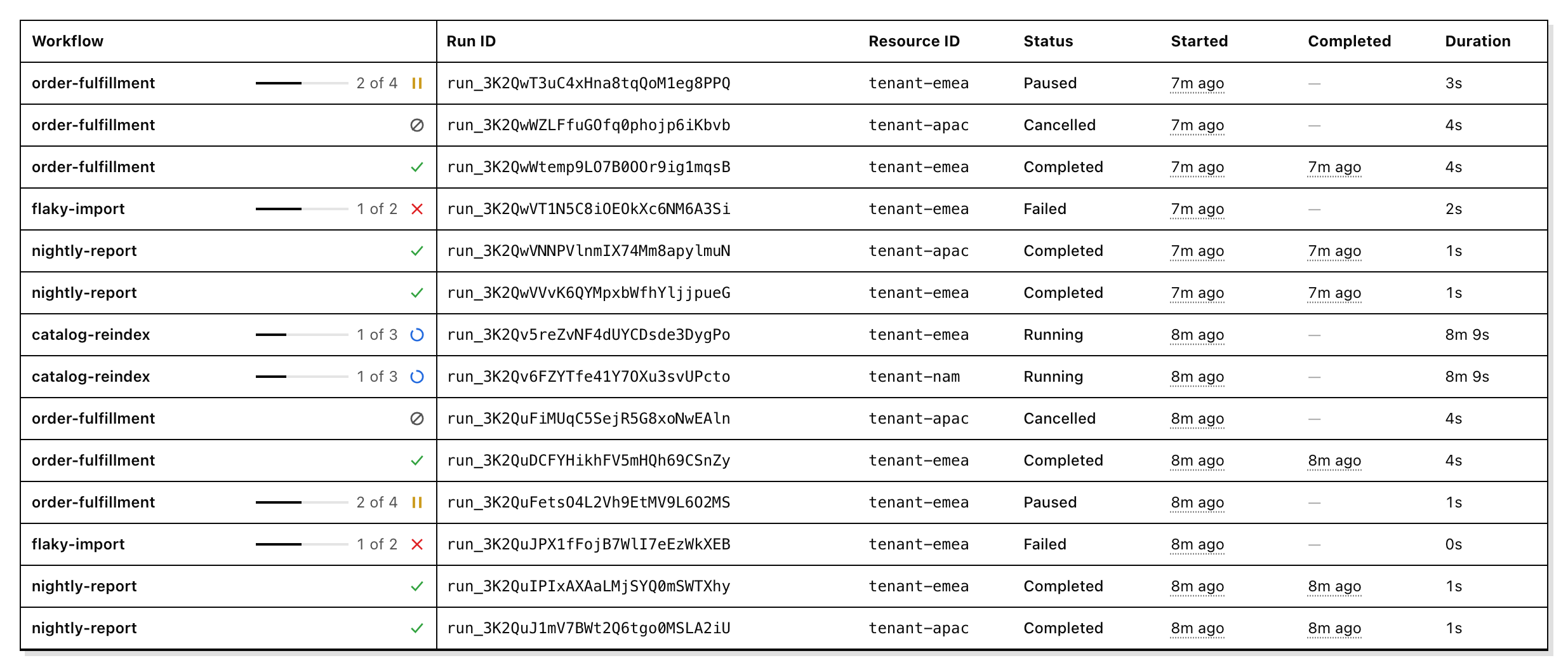
The list of runs, with step progress, IDs, status, timestamps, and duration.
<RunsTable
  runs={rows}
  isLoading={runs.isLoading}
  selectedRunId={runId}
  onSelectRun={setRunId}
/>
<RunDetail/>
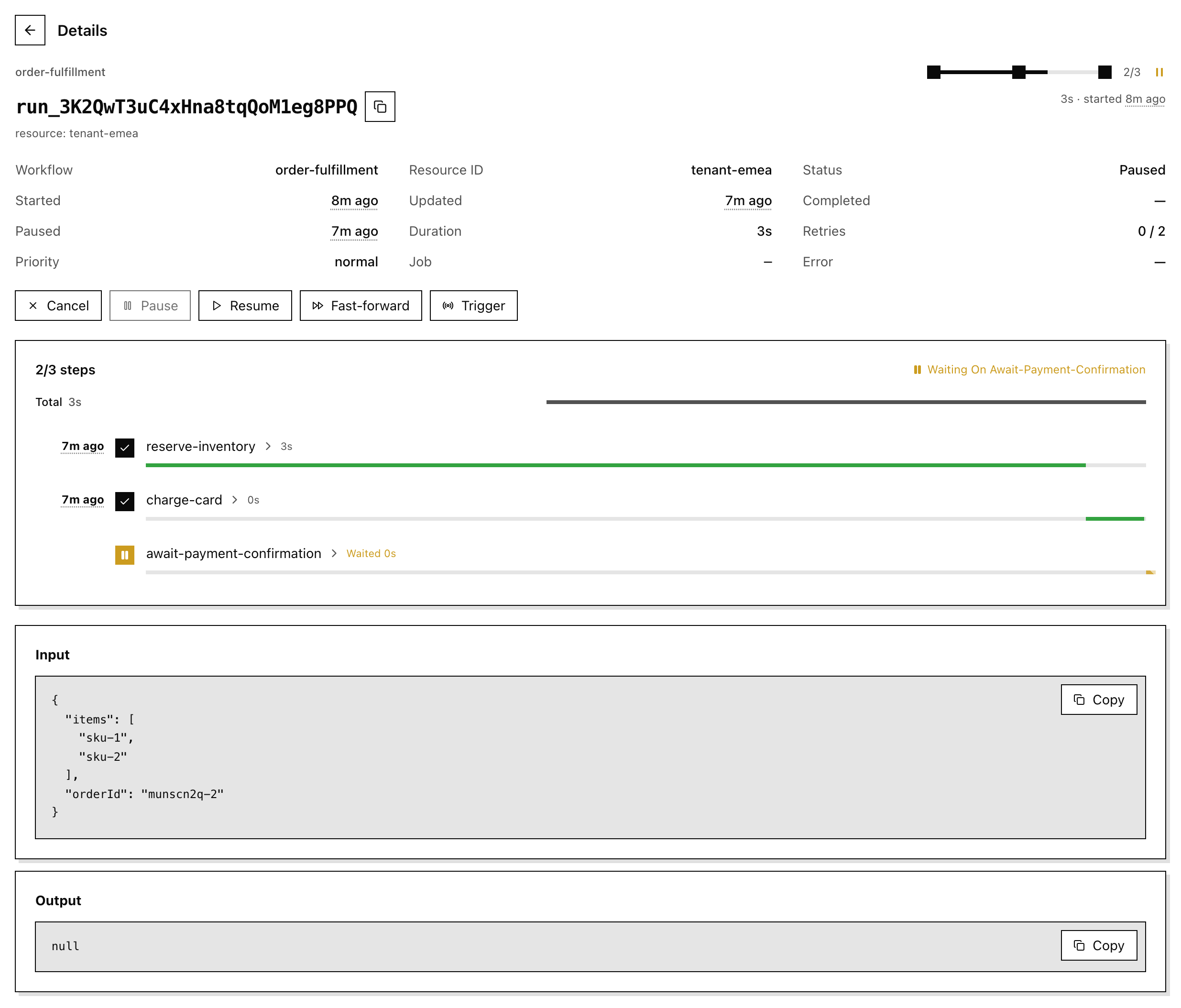
One run: header, details, lifecycle actions, step timeline, and input and output. It loads the run and calls the actions itself.
<RunDetail runId={runId} onBack={() => setRunId(null)} />
<StatusSummary/>
A count per status. Click a count to filter by that status.

<StatusSummary
  counts={stats.data ?? {}}
  onSelectStatus={(status) => filter({ statuses: [status] })}
/>
<FilterBar/>
Search, plus status, workflow, date, and duration filters.

<FilterBar
  filters={filters}
  hasActiveFilters={hasActiveFilters}
  workflowIds={['nightly-report', 'order-fulfillment']}
  onFiltersChange={filter}
  onClear={clearFilters}
/>
<Pagination/>
Previous and next controls for the cursor-paginated list.
<Pagination
  hasPrev={!!runs.data?.hasPrev}
  hasNext={!!runs.data?.hasMore}
  isFetching={runs.isFetching}
  onPrev={() =>
    setFilters({ endingBefore: runs.data?.prevCursor ?? undefined, startingAfter: undefined })
  }
  onNext={() =>
    setFilters({ startingAfter: runs.data?.nextCursor ?? undefined, endingBefore: undefined })
  }
/>
<LiveToggle/>
A Live / Paused switch for polling. You own the state and pass the matching interval to the provider.
<LiveToggle isLive={live} isFetching={runs.isFetching} onToggle={onToggleLive} />
<StatusBadge/>
A status label.

<StatusBadge status={run.status} />
Compose the components
The same wiring <WorkflowRunsDashboard/> uses, as one client component. Filter changes reset the page cursor, and the client-side filters (search, date, duration) and sort are applied to the current page before rendering.
'use client'
import {
  applyClientFilters,
  createFetchClient,
  FilterBar,
  LiveToggle,
  Pagination,
  RunDetail,
  type RunFilters,
  RunsTable,
  StatusSummary,
  sortRuns,
  useRunFilters,
  useWorkflowIds,
  useWorkflowRunStats,
  useWorkflowRuns,
  WorkflowRunsProvider,
} from '@pg-workflows/ui'
import { QueryClient, QueryClientProvider } from '@tanstack/react-query'
import { useState } from 'react'

const client = createFetchClient({ baseUrl: '/workflow-runs' })

export function RunsPage() {
  const [queryClient] = useState(() => new QueryClient())
  const [live, setLive] = useState(true)

  return (
    <QueryClientProvider client={queryClient}>
      <WorkflowRunsProvider client={client} pollIntervalMs={live ? 5000 : 0}>
        <div className="pgw-root flex flex-col gap-5">
          <Runs live={live} onToggleLive={() => setLive((v) => !v)} />
        </div>
      </WorkflowRunsProvider>
    </QueryClientProvider>
  )
}

function Runs({ live, onToggleLive }: { live: boolean; onToggleLive: () => void }) {
  const { filters, setFilters, clearFilters, hasActiveFilters, serverParams } = useRunFilters()
  const runs = useWorkflowRuns(serverParams)
  const stats = useWorkflowRunStats({ workflowId: filters.workflowId })
  const workflowIds = useWorkflowIds()
  const [runId, setRunId] = useState<string | null>(null)

  const filter = (partial: Partial<RunFilters>) =>
    setFilters({ ...partial, startingAfter: undefined, endingBefore: undefined })

  const rows = sortRuns(
    applyClientFilters(runs.data?.items ?? [], filters),
    filters.sort,
    filters.dir,
  )

  if (runId) return <RunDetail runId={runId} onBack={() => setRunId(null)} />

  return (
    <>
      <LiveToggle isLive={live} isFetching={runs.isFetching} onToggle={onToggleLive} />
      <StatusSummary
        counts={stats.data ?? {}}
        onSelectStatus={(status) => filter({ statuses: [status] })}
      />
      <FilterBar
        filters={filters}
        hasActiveFilters={hasActiveFilters}
        workflowIds={workflowIds.data ?? []}
        onFiltersChange={filter}
        onClear={clearFilters}
      />
      <RunsTable
        runs={rows}
        isLoading={runs.isLoading}
        selectedRunId={runId}
        onSelectRun={setRunId}
      />
      <Pagination
        hasPrev={!!runs.data?.hasPrev}
        hasNext={!!runs.data?.hasMore}
        isFetching={runs.isFetching}
        onPrev={() =>
          setFilters({ endingBefore: runs.data?.prevCursor ?? undefined, startingAfter: undefined })
        }
        onNext={() =>
          setFilters({ startingAfter: runs.data?.nextCursor ?? undefined, endingBefore: undefined })
        }
      />
    </>
  )
}
Build a custom UI
Wrap your tree in WorkflowRunsProvider once. Every hook reads from it and returns a plain TanStack Query result, so loading, error, and refetch states work as usual.
'use client'
import { createFetchClient, WorkflowRunsProvider } from '@pg-workflows/ui'
import { QueryClient, QueryClientProvider } from '@tanstack/react-query'
import type { ReactNode } from 'react'

const queryClient = new QueryClient()
const client = createFetchClient({ baseUrl: '/workflow-runs' })

export function Providers({ children }: { children: ReactNode }) {
  return (
    <QueryClientProvider client={queryClient}>
      <WorkflowRunsProvider client={client}>{children}</WorkflowRunsProvider>
    </QueryClientProvider>
  )
}
useWorkflowRuns(): list runs
import { useWorkflowRuns } from '@pg-workflows/ui'

export function FailedRuns() {
  const { data, isLoading } = useWorkflowRuns({ limit: 20, statuses: ['failed'] })

  if (isLoading) return <p>Loading…</p>

  return (
    <ul>
      {data?.items.map((run) => (
        <li key={run.id}>
          {run.workflowId}: {run.status}
        </li>
      ))}
    </ul>
  )
}
useWorkflowRun(): one run
Polls until the run reaches a terminal status.
import { useWorkflowRun } from '@pg-workflows/ui'

export function RunStatus({ runId }: { runId: string }) {
  const { data: run } = useWorkflowRun(runId)

  return (
    <p>
      {run?.workflowId} is {run?.status}
    </p>
  )
}
useWorkflowRunStats(): counts by status
import { useWorkflowRunStats } from '@pg-workflows/ui'

export function RunCounts() {
  const { data: stats } = useWorkflowRunStats()

  return (
    <p>
      {stats?.failed ?? 0} failed, {stats?.running ?? 0} running
    </p>
  )
}
useWorkflowIds(): workflow filter options
The registered workflow IDs on the engine, plus every workflow ID that has a run. <WorkflowRunsDashboard/> uses this for the workflow filter, so the options are not limited to the current page.
import { useWorkflowIds } from '@pg-workflows/ui'

export function WorkflowOptions() {
  const { data: workflowIds } = useWorkflowIds()

  return (
    <ul>
      {workflowIds?.map((id) => (
        <li key={id}>{id}</li>
      ))}
    </ul>
  )
}
useRunActions(): control a run
import { useRunActions } from '@pg-workflows/ui'

export function RunControls({ runId }: { runId: string }) {
  const { cancel, resume, trigger } = useRunActions()

  return (
    <>
      <button
        type="button"
        onClick={() => resume.mutate({ id: runId })}
        disabled={resume.isPending}
      >
        Resume
      </button>
      <button type="button" onClick={() => cancel.mutate({ id: runId })}>
        Cancel
      </button>
      <button
        type="button"
        onClick={() =>
          trigger.mutate({ id: runId, eventName: 'payment-confirmed', data: { ok: true } })
        }
      >
        Confirm payment
      </button>
    </>
  )
}
After each successful action, the run and every runs list refetch.
useRunFilters(): filter state
Holds the filter, sort, and cursor state. Pass serverParams to useWorkflowRuns.
import { useRunFilters, useWorkflowRuns } from '@pg-workflows/ui'

export function RunsByWorkflow() {
  const { filters, setFilters, serverParams } = useRunFilters()
  const runs = useWorkflowRuns(serverParams)

  return (
    <>
      <select
        value={filters.workflowId ?? ''}
        onChange={(e) =>
          setFilters({
            workflowId: e.target.value || undefined,
            startingAfter: undefined,
            endingBefore: undefined,
          })
        }
      >
        <option value="">All workflows</option>
        <option value="nightly-report">nightly-report</option>
      </select>
      <p>{runs.data?.items.length ?? 0} runs on this page</p>
    </>
  )
}
API reference
- Entry points
- CLI
- Components:
WorkflowRunsDashboard·RunsTable·RunDetail·StatusSummary·FilterBar·Pagination·LiveToggle·StatusBadge WorkflowRunsProvider- Hooks:
useWorkflowRuns·useWorkflowRun·useWorkflowRunStats·useWorkflowIds·useRunActions·useRunFilters·useWorkflowRunsClient - Helpers
createFetchClient- Server adapters
- HTTP API
- Security
- Styling & customization
- Architecture
Entry points
Client code never imports the server entries, so a browser bundle does not pull in the engine.
| Import | Contents | Runs |
|---|---|---|
@pg-workflows/ui |
Components, hooks, provider, helpers, and a re-export of createFetchClient and its types |
client |
@pg-workflows/ui/client |
createFetchClient and types, no React |
client or server |
@pg-workflows/ui/server |
createWorkflowRunsApi, toFetchHandler, toNodeHandler, HttpError, toErrorResponse |
server only |
@pg-workflows/ui/next |
createAppRouterHandler, createPagesApiHandler, createRouteHandlers |
server only |
@pg-workflows/ui/tailwind |
Tailwind preset for a subset of the pgw-* color tokens |
build |
@pg-workflows/ui/styles.css |
CSS variables (light and dark), Tailwind @theme tokens, and component styles |
client |
pg-workflows-ui (bin) |
Standalone localhost dashboard | CLI |
Peer dependencies: react >= 18, react-dom >= 18, @tanstack/react-query >= 5, tailwindcss ^4, pg-workflows >= 0.13.0. pg-workflows in turn needs pg.
CLI
npx @pg-workflows/ui [--database-url=<url>] [--port=3777]
| Flag | Default | Description |
|---|---|---|
--database-url |
DATABASE_URL, else postgres://localhost:5432/postgres |
Postgres connection string |
--port |
3777 |
Port to listen on |
-h, --help |
Print usage |
- The server binds to
127.0.0.1only. It has no authentication and noresolveContext, so anyone who can reach the port can read and change every run. Do not expose it. - It starts an engine with no registered workflows.
engine.start()runs migrations if needed. Because no workflows are registered, the runs table shows step progress only from each run’s timeline. engine.start()also starts queue workers on the shared run queue. A job those workers pick up fails withWorkflow <id> not found, because the CLI has no definitions. Prefer it for local databases, and embed the components in your app when it runs against a live queue.- It serves the API under
/workflow-runsand the prebuilt dashboard on every other path.
Components
Every component takes className, style, and render (see Styling & customization) and forwards a ref to its root element. StatusSummary is the exception when it renders nothing.
WorkflowRunsDashboard
Self-contained dashboard. It creates its own QueryClient (with query retries off) and WorkflowRunsProvider. Pass exactly one of baseUrl or client.
| Prop | Type | Default | Description |
|---|---|---|---|
baseUrl |
string |
Prefix of the mounted API routes. Mutually exclusive with client. Read once on mount. |
|
client |
WorkflowRunsClient |
A client, usually from createFetchClient. Mutually exclusive with baseUrl. Read once on mount. |
|
pollIntervalMs |
number |
5000 while Live, 0 while paused |
Refresh interval. When set, it overrides the Live toggle: the button still switches, but the interval stays fixed. |
selectedRunId |
string \| null |
Controlled selection. Pair with onSelectRun and your router for deep links. When omitted, the dashboard tracks selection itself. |
|
onSelectRun |
(id: string \| null) => void |
Called when a row is opened (id) or the detail view is closed (null). |
The workflow filter lists the workflow IDs on the current page. Style state: { selected: boolean }.
RunsTable
| Prop | Type | Default | Description |
|---|---|---|---|
runs |
WorkflowRun[] |
Rows to render, in order. | |
onSelectRun |
(id: string) => void |
Called when a row is clicked, or on Enter or Space. | |
selectedRunId |
string \| null |
Highlights the matching row. | |
isLoading |
boolean |
false |
While runs is empty, shows “Loading…” instead of “No runs”. |
Columns: Workflow, Run ID (copyable), Resource ID, Status, Started, Completed, Duration. The Workflow cell shows step progress for running, paused, and failed runs, using the larger of the timeline’s step count and totalSteps. Style state: { empty: boolean, loading: boolean }.
RunDetail
Must render under WorkflowRunsProvider. It calls useWorkflowRun(runId) and useRunActions().
| Prop | Type | Default | Description |
|---|---|---|---|
runId |
string |
Run to load. | |
onBack |
() => void |
Renders a back control that calls this. When omitted, there is no back control. |
It renders:
- A header with the workflow ID, run ID, and step progress.
- A details grid: workflow, resource ID, status, timestamps, duration, retries, priority, job, and error. Priority
100,0, and-100display ashigh,normal, andlow. - The actions: Cancel, Pause, Resume, Fast-forward, and Trigger. All are disabled once the run is terminal. Pause is enabled only while the run is
running, and Resume only while it ispaused. Each action shows a success or error message. - The step timeline, and input and output JSON. A failed run’s error is shown above the steps.
Fast-forward sends no data. The engine completes the current wait step only when the run is paused on one, and otherwise returns the run unchanged. Trigger always sends an event named resume with no data. To send another event, call useRunActions().trigger yourself.
Style state: { phase: 'loading' | 'error' | 'ready', status?: string }.
StatusSummary
| Prop | Type | Default | Description |
|---|---|---|---|
counts |
Partial<Record<WorkflowRunStatus, number>> |
Counts by status, usually useWorkflowRunStats().data. |
|
onSelectStatus |
(status: WorkflowRunStatus) => void |
Called when a count is clicked. | |
trailing |
ReactNode |
Rendered after the counts. | |
stat |
{ className?, style?, render? } |
Style hooks for each count button. They receive that button’s state. |
Renders one button per status with a count above zero. When every count is 0, it renders nothing, so there is no element for ref. Style state: { empty: boolean } (always false while rendered).
FilterBar
| Prop | Type | Description |
|---|---|---|
filters |
RunFilters |
Current filters, from useRunFilters. |
hasActiveFilters |
boolean |
Enables the Clear control. |
workflowIds |
string[] |
Options for the workflow filter. <WorkflowRunsDashboard/> fills this from useWorkflowIds(). |
onFiltersChange |
(partial: Partial<RunFilters>) => void |
Called with the changed fields. Reset startingAfter and endingBefore here, or the next request stays on a cursor from the previous filter. |
onClear |
() => void |
Called by the Clear control. |
Style state: { active: boolean }.
Pagination
| Prop | Type | Default | Description |
|---|---|---|---|
hasPrev |
boolean |
Enables Prev. | |
hasNext |
boolean |
Enables Next. | |
onPrev |
() => void |
Called by Prev. | |
onNext |
() => void |
Called by Next. | |
isFetching |
boolean |
false |
Disables both buttons while a page loads. |
Style state: { hasPrev, hasNext, fetching }.
LiveToggle
A Base UI Toggle.
| Prop | Type | Default | Description |
|---|---|---|---|
isLive |
boolean |
Pressed state. | |
isFetching |
boolean |
Sets data-fetching while a request is in flight. |
|
onToggle |
() => void |
Called on press. Pass pollIntervalMs={isLive ? 5000 : 0} to the provider. |
|
nativeButton |
boolean |
true |
Set to false when render is not a <button>. |
Style state: Base UI toggle state (pressed, disabled). Also sets data-pressed and data-fetching.
StatusBadge
| Prop | Type | Description |
|---|---|---|
status |
WorkflowRunStatus |
'pending' \| 'running' \| 'paused' \| 'completed' \| 'failed' \| 'cancelled' |
Sets data-status. Style state: { status }.
WorkflowRunsProvider
| Prop | Type | Default | Description |
|---|---|---|---|
client |
WorkflowRunsClient |
Used by every hook below. | |
pollIntervalMs |
number |
5000 |
Refresh interval for every query under the provider. 0 turns polling off. |
children |
ReactNode |
The hooks use TanStack Query, so the provider must render inside a QueryClientProvider.
Hooks
Every hook must run under WorkflowRunsProvider.
useWorkflowRuns(params)
List query. Returns UseQueryResult<ListRunsResult>.
| Param | Type | Description |
|---|---|---|
limit |
number |
Required. Page size, at most 100. |
statuses |
WorkflowRunStatus[] |
Filter by status. |
workflowId |
string |
Filter by workflow. |
startingAfter |
string |
Cursor for the next page. |
endingBefore |
string |
Cursor for the previous page. |
data is { items, nextCursor, prevCursor, hasMore, hasPrev }. The hook refetches while pollIntervalMs > 0 and keeps the previous page on screen while the next one loads. Each item is a WorkflowRun from pg-workflows, plus totalSteps? when the workflow is registered on the server’s engine.
useWorkflowRun(id)
Single run. Returns UseQueryResult<WorkflowRun>. The query is disabled while id is empty. It polls on the provider interval and stops once the status is terminal (completed, failed, or cancelled).
useWorkflowRunStats(params?)
Counts by status. Returns UseQueryResult<Record<WorkflowRunStatus, number>>. params is { workflowId?: string }. Polls on the provider interval.
useWorkflowIds()
Workflow filter options. Returns UseQueryResult<string[]>. The list is the union of workflow IDs registered on the engine and distinct workflow IDs that have runs. Polls on the provider interval.
useRunActions()
Returns { cancel, pause, resume, fastForward, trigger }. Each is its own UseMutationResult<WorkflowRun>, so isPending and error are tracked per action. On success, the run and every runs list are invalidated.
| Action | Variables | Engine call |
|---|---|---|
cancel |
{ id } |
cancelWorkflow |
pause |
{ id } |
pauseWorkflow |
resume |
{ id } |
resumeWorkflow |
fastForward |
{ id, data? } |
fastForwardWorkflow: completes the current wait step with data when the run is paused on one |
trigger |
{ id, eventName, data? } |
triggerEvent |
useRunFilters(initial?)
Local filter state. initial: Partial<RunFilters> is merged over the defaults { limit: 20, sort: 'createdAt', dir: 'desc' }.
RunFilters:
| Field | Type | Applied |
|---|---|---|
limit |
number |
server |
startingAfter, endingBefore |
string |
server |
statuses |
WorkflowRunStatus[] |
server |
workflowId |
string |
server |
search |
string |
client (matches run ID, workflow ID, resource ID) |
datePreset |
'all' \| '1h' \| '24h' \| '7d' \| '30d' \| '90d' |
client |
durationPreset |
'any' \| 'lt-10s' \| 'lt-30s' \| 'lt-1m' \| 'gt-30s' \| 'gt-1m' \| 'gt-5m' \| 'gt-10m' |
client |
sort |
'id' \| 'workflowId' \| 'createdAt' \| 'status' \| 'duration' |
client |
dir |
'asc' \| 'desc' |
client |
Client-side fields apply to the current page only, because the engine paginates by cursor. Apply them with applyClientFilters and sortRuns.
Returns:
| Field | Description |
|---|---|
filters |
The full RunFilters object. |
serverParams |
{ limit, startingAfter, endingBefore, statuses, workflowId }. Pass it to useWorkflowRuns. |
setFilters(partial) |
Merges a partial update. |
replaceFilters(next) |
Replaces the whole object. |
clearFilters() |
Resets to the defaults above, not to initial. |
toggleSort(key) |
Sorts by key, starting with desc. Calling it again on the same key flips between desc and asc. |
hasActiveFilters |
true when status, workflow ID, date, duration, or search is set. |
useWorkflowRunsClient()
Returns { client, pollIntervalMs } from the provider. Throws outside WorkflowRunsProvider.
Helpers
Exported from @pg-workflows/ui. <WorkflowRunsDashboard/> uses them to apply the client-side filters:
const rows = sortRuns(
  applyClientFilters(runs.data?.items ?? [], {
    search: filters.search,
    datePreset: filters.datePreset,
    durationPreset: filters.durationPreset,
  }),
  filters.sort,
  filters.dir,
)
| Export | Description |
|---|---|
applyClientFilters(runs, filters) |
Filters a page of runs. filters is ClientFilters: { search?, datePreset?, durationPreset?, from?, to?, minDurationMs?, maxDurationMs? }. from and to are ISO strings compared with createdAt, and override datePreset. minDurationMs and maxDurationMs override durationPreset. |
sortRuns(runs, key, dir) |
Returns a sorted copy. |
computeDurationMs(run) |
Run duration in ms, or null for a pending run. |
formatDuration(ms) |
'1m 5s' style string. |
timeAgo(date, now?) |
'7m ago' style string, or 'in 7m' for a future date. |
isTerminalStatus(status) |
true for completed, failed, cancelled. |
DATE_PRESETS, DURATION_PRESETS |
{ value, label }[] option lists used by FilterBar. |
datePresetToFrom(preset, now?) |
ISO lower bound for a date preset, or undefined for 'all'. |
durationPresetToBounds(preset) |
{ minDurationMs?, maxDurationMs? } for a duration preset. |
createFetchClient(options)
From @pg-workflows/ui or @pg-workflows/ui/client (no React). Returns a WorkflowRunsClient that calls the HTTP API.
| Option | Type | Description |
|---|---|---|
baseUrl |
string |
Prefix of the mounted routes. A trailing slash is ignored. |
fetch |
typeof fetch |
Custom fetch, for example to add auth headers. Defaults to globalThis.fetch. |
interface WorkflowRunsClient {
  listRuns(params: ListRunsParams): Promise<ListRunsResult>
  getRun(id: string): Promise<WorkflowRun>
  getStats(params?: { workflowId?: string }): Promise<WorkflowRunStats>
  listWorkflowIds(): Promise<string[]>
  cancelRun(id: string): Promise<WorkflowRun>
  pauseRun(id: string): Promise<WorkflowRun>
  resumeRun(id: string): Promise<WorkflowRun>
  fastForwardRun(id: string, body?: { data?: Record<string, unknown> }): Promise<WorkflowRun>
  triggerEvent(id: string, body: { eventName: string; data?: Record<string, unknown> }): Promise<WorkflowRun>
}
Any non-2xx response throws an Error with the status code in its message. To back the components with something other than HTTP, implement the interface yourself.
Server adapters
| Export | From | Description |
|---|---|---|
createWorkflowRunsApi({ engine, basePath?, resolveContext? }) |
/server |
Returns fetch(request), which routes by method and path, plus one handler per endpoint (listRuns(req), getRun(req, id), getStats(req), cancelRun(req, id), and so on). basePath defaults to /workflow-runs. resolveContext(req) returns { resourceId? } or throws (see Security). |
toFetchHandler(source) |
/server |
Turns an API object, or a (request) => Promise<Response> function, into one Fetch function. |
toNodeHandler(source) |
/server |
Node (req, res) adapter for Express, Fastify (req.raw / reply.raw), Nest, or node:http. Takes an API object or a Fetch function. |
HttpError, toErrorResponse(err) |
/server |
The error mapping the adapter uses (see HTTP API). Use them in your own routes to return the same status codes. |
createAppRouterHandler(source) |
/next |
{ GET, POST } for an App Router catch-all. source is { engine, basePath?, resolveContext? }, where engine is an engine or a function that returns one (sync or async). The first request awaits engine.start() and builds the API once. source can also be an existing API object or Fetch function. |
createPagesApiHandler(source) |
/next |
Default export for a Pages Router catch-all. Takes the same source and starts the engine the same way. |
createRouteHandlers(source) |
/next |
{ list, detail, cancel, pause, resume, fastForward, trigger } for a route.ts per path, for example to wrap mutations in extra auth. Takes the same source. Each entry is the same path-based dispatcher, so each file must sit at the path it serves. |
engine only needs the methods the API calls (getRuns, getRun, getStats, listWorkflowIds, cancelWorkflow, pauseWorkflow, resumeWorkflow, fastForwardWorkflow, triggerEvent) and optionally workflows, which supplies totalSteps. A WorkflowEngine has all of them. listWorkflowIds on the engine is the union of registered workflow IDs and distinct IDs from runs.
The adapters use Web Request / Response and send no CORS headers. Serve the dashboard and the API from the same origin, for example with a Vite dev-server proxy.
Next.js App Router
Add it to your app covers the App Router setup: an engine singleton in lib/engine.ts and one catch-all route.
- Pass
getEngine, notgetEngine(). The handler calls it on every request, so it must return the same engine each time. - The first request awaits
engine.start(), and later requests reuse that promise. <WorkflowRunsDashboard/>can be imported from a Server Component. The components carry their own'use client'directives.
Next.js Pages Router
Set basePath to the public URL Next puts on the request:
// pages/api/workflow-runs/[[...path]].ts
import { createPagesApiHandler } from '@pg-workflows/ui/next'
import { getEngine } from '@/lib/engine'

export default createPagesApiHandler({ engine: getEngine, basePath: '/api/workflow-runs' })
<WorkflowRunsDashboard baseUrl="/api/workflow-runs" />
Express
import express from 'express'
import { createWorkflowRunsApi, toNodeHandler } from '@pg-workflows/ui/server'
import { engine } from './engine'

const runsApi = createWorkflowRunsApi({ engine, basePath: '/workflow-runs' })

const app = express()
app.use('/workflow-runs', toNodeHandler(runsApi))
basePathmust match the mount.toNodeHandlerreadsreq.originalUrl, which keeps the prefix that Express strips fromreq.url.- Don’t run
express.json()on this path. It consumes the body before the handler can read it.
Hono
app.all('/workflow-runs', (c) => runsApi.fetch(c.req.raw))
app.all('/workflow-runs/*', (c) => runsApi.fetch(c.req.raw))
TanStack Start
The list path and the splat are separate files, because /workflow-runs/$ does not match GET /workflow-runs.
// src/routes/workflow-runs.index.ts
export const Route = createFileRoute('/workflow-runs')({
  server: { handlers: { GET: ({ request }) => runsApi.fetch(request) } },
})

// src/routes/workflow-runs/$.ts
const handle = ({ request }: { request: Request }) => runsApi.fetch(request)
export const Route = createFileRoute('/workflow-runs/$')({
  server: { handlers: { GET: handle, POST: handle } },
})
Bun and Deno
Bun.serve({ fetch: (request) => runsApi.fetch(request) })
Deno.serve((request) => runsApi.fetch(request))
Requests outside basePath get a 404 from the adapter.
HTTP API
All paths are under basePath (default /workflow-runs). Responses are JSON.
| Method and path | Engine call |
|---|---|
GET / |
getRuns (query: starting_after, ending_before, limit up to 100, workflow_id, statuses, repeatable) |
GET /stats |
getStats (query: workflow_id) |
GET /workflows |
listWorkflowIds |
GET /:id |
getRun |
POST /:id/cancel |
cancelWorkflow |
POST /:id/pause |
pauseWorkflow |
POST /:id/resume |
resumeWorkflow |
POST /:id/fast-forward |
fastForwardWorkflow (body: { data? }) |
POST /:id/trigger |
triggerEvent (body: { eventName, data? }) |
Errors return { error, message?, issues? }. issues lists validation failures. An in_progress error also carries workflowId and runId.
| Status | error |
Cause |
|---|---|---|
400 |
validation |
Invalid query, body, or JSON, or an engine validation error |
401 |
unauthorized |
resolveContext threw |
404 |
not_found |
Unknown run or path |
405 |
method_not_allowed |
Wrong method for the path |
409 |
in_progress |
WorkflowRunInProgressError (a singleton slot is taken) |
409 |
conflict |
Any other engine error, such as an illegal transition |
500 |
internal |
Anything else |
Security
The adapter leaves authentication to your app, so put the routes behind your own middleware.
For scoping, use resolveContext. The resourceId it returns is passed to every read and every action, so a caller only sees and changes their own runs. The adapter never reads resourceId from the request.
createWorkflowRunsApi({
  engine,
  // Return the caller's tenant. Throw to respond with 401.
  resolveContext: async (req) => ({ resourceId: await getTenantId(req) }),
})
getTenantId stands for your own session lookup.
Open by default. Without
resolveContext, the adapter reads and changes every run in the database. That is fine for a single-tenant dashboard behind your auth. PassresolveContextwhen several tenants share the database.
Styling & customization
The components are Base UI parts with a default theme: square corners, a 1px ink border, neutral surfaces, and a hard offset shadow. Status color is the only chroma.
classNameandstyletake a value, or a function of the component’s state (listed with each component above).renderreplaces the root element instead of wrapping it. The part’s props and behavior move to the element you pass.- State is also written as
data-*attributes, so plain CSS can target it. - Style the public root and documented parts (
statonStatusSummary). Markup inside a part may change between releases.
Recolor with CSS variables. Override any --pgw-* token on :root or a closer scope:
:root {
  --pgw-accent: #6d28d9;
  --pgw-accent-fg: #fff;
  --pgw-border: #e5e5e5;
  --pgw-radius: 0.5rem;
  --pgw-font: 'IBM Plex Sans', sans-serif;
  --pgw-focus: #6d28d9;
  --pgw-status-running: #2563eb;
}
The other tokens are --pgw-bg, --pgw-fg, --pgw-card, --pgw-muted, --pgw-muted-fg, --pgw-hover, --pgw-active, --pgw-disabled, --pgw-shadow, --pgw-on-status, --pgw-status-completed, --pgw-status-failed, --pgw-status-paused, --pgw-status-cancelled, and --pgw-status-pending.
Dark mode follows prefers-color-scheme. There is no toggle yet.
Restyle one component with the style hooks:
<StatusBadge
  status={run.status}
  className={(state) => (state.status === 'failed' ? 'ring-2 ring-red-600' : undefined)}
/>

<StatusSummary counts={counts} stat= />
.pgw-badge[data-status='failed'] { color: #b91c1c; }
.pgw-live[data-pressed] { border-color: var(--pgw-status-running); }
Use the tokens in your own markup. styles.css registers them with Tailwind v4 @theme: bg-pgw-bg, text-pgw-fg, border-pgw-border, text-pgw-status-running, shadow-pgw, font-pgw, and more.
<span className="bg-pgw-status-running px-2 text-pgw-on-status">running</span>
Add pgw-root to your container when you compose the components yourself. It sets the background, foreground, and font. <WorkflowRunsDashboard/> already applies it. The stable classes .pgw-button, .pgw-badge, .pgw-input, .pgw-popup, .pgw-filters, .pgw-stat, and .pgw-live live in @layer components, so your utilities override them.
With a JS Tailwind config instead of @source, add the preset and the package to content. The preset covers a subset of the color tokens. It omits pgw-card, pgw-accent-fg, and pgw-disabled, and adds no shadow-pgw or font-pgw.
import pgwPreset from '@pg-workflows/ui/tailwind'

export default {
  presets: [pgwPreset],
  content: ['./node_modules/@pg-workflows/ui/dist/**/*.js'],
}
Architecture
flowchart LR
  UI["Components and hooks"] --> Client["createFetchClient"]
  Client --> HTTP["HTTP /workflow-runs"]
  HTTP --> API["createWorkflowRunsApi"]
  API --> Engine["WorkflowEngine"]
  Engine --> DB[("PostgreSQL")]
The components call the hooks, the hooks call the HTTP API through the client, and the server adapter calls WorkflowEngine. Only the server connects to Postgres.
License
MIT